
Early access
Go deeper at unmoderated scale
Uncover more of the reasoning, expectations, and context behind customer feedback. AI Moderation asks relevant follow-up questions based on what participants say, bringing conversational depth to unmoderated studies so teams can gain richer insights across more sessions.

Limited early access available.
Get deeper customer understanding across more sessions
AI Moderation brings adaptive follow-up questions to New Think Out Loud studies, helping teams explore participant responses in greater depth without requiring every conversation to be live.
Follow up when something matters
Ask relevant follow-up questions based on what participants say, adapting to their responses to explore important details in the moment.

Understand more of the why
Uncover the reasoning, expectations, and hesitation behind responses, with more context to understand why people react the way they do.

Bring conversational depth across more sessions
Gather richer qualitative feedback across more participant sessions without scheduling a live conversation for every study.

Guide the conversation
Give AI Moderation context about what you want to learn so it can focus follow-up questions on the topics that matter most.
The complete exchange stays connected to the session recording and transcript, giving teams richer context to review and analyze.
Part of a broader AI-powered research workflow
AI Moderation helps deepen the customer conversation. Expanded UserTesting MCP capabilities can bring complete session conversations back into AI-enabled workflows for analysis and synthesis.
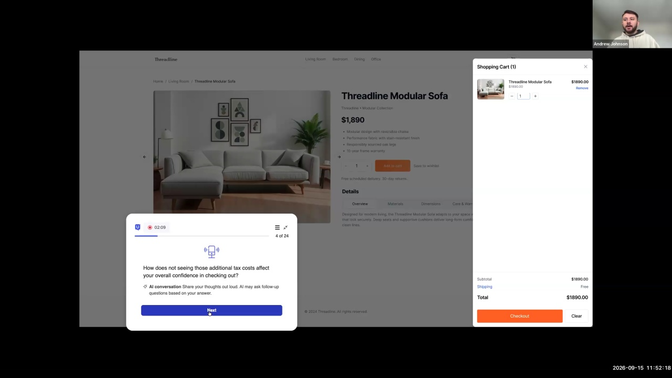
See AI Moderation in action
See how AI Moderation responds to what participants say and asks relevant follow-up questions during a New Think Out Loud study.
Limited early access is available for select customers.
Bring more conversational depth to your next study
Discover how AI Moderation can help your team uncover richer customer insights at unmoderated scale.
Request Early Access
FAQ
Top Recruiting Features
How teams use MCP

With UserTesting connected via MCP, teams can bring behavioral data and UserTesting qualitative insight into the same Claude or ChatGPT session. Ask why checkout abandonment is rising and get an answer that draws on web analytics funnel data and UserTesting verbatims together — so the brief that comes out of it is sharper, more defensible, and visible to the people making decisions in real time.

When you prompt Figma Make or Claude without customer context, the model only knows patterns — not how your specific users actually think or abandon. MCP loads real customer insight before it generates anything, so the first direction is more accurate. And when you've already built something fast and need to validate it, UserTesting is right there — no separate tool, no broken flow.

Study creation and recruiting through User Interviews happen alongside each other — inside Claude, ChatGPT, or Figma Make. Insights surface in Slack and AI assistants where the rest of the team already is, so decisions get made with real customer understanding — not because insights got louder, but because it got closer to where decisions happen.