


Coming soon: the new and improved UserTesting dashboard

We will be releasing our updated dashboard to make substantial UI enhancements that will help our customers work more efficiently and stay organized.
Like other high growth companies, we continue to develop new features and launch experiences for different customer groups. With all the things we’ve added in 2019 alone, we knew that we had to better organize our dashboard elements to ensure that customers know where to access all the things we’ve thoughtfully created.
Introducing the new dashboard
We’ve made the following changes to our dashboard:
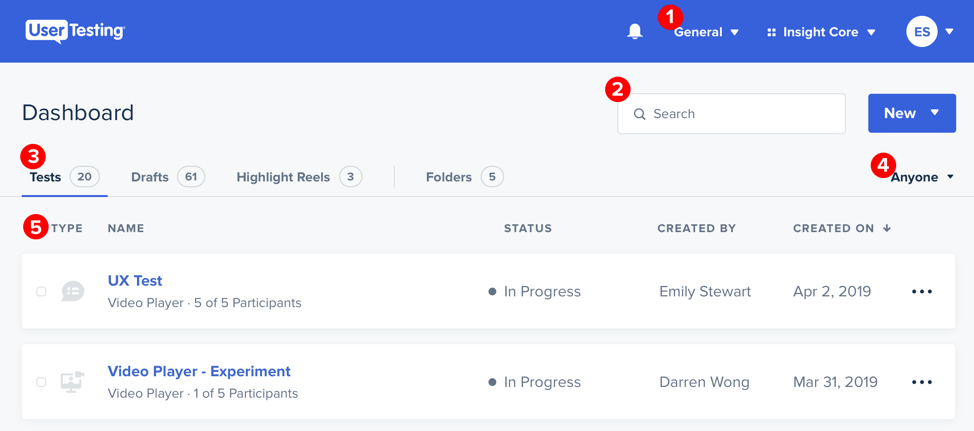
- Workspaces (available to Premium subscription customers) has moved to the navigation bar, making it easier to switch between different workspaces.
- We gave the Search bar more room, making it easier to search for items, such as the test name.
- Tab navigation allows switching between Tests, Drafts, Highlight Reels, and Folders for the workspace you have filtered.
- New dropdown allows filtering by the name of the person who created the test.
- Visible labels enable quick identification and location of tests. The icons designate the type of test that was run: unmoderated (the first icon) or a Live Conversation session (the second icon).
Additionally, the updated Dashboard provides a scalable information architecture that supports not only current elements but also things we may develop in the future. As organizational guru Marie Kondo has stated:
The space in which we live should be for the person we are becoming now. Not for the person we were in the past.
Finally, we also wanted to drive consistency and coherence across the entire platform—again not only for past releases but also for anything we may develop in the future. Channeling our inner Marie Kondos once more, we audited and then organized what we currently have in order to drive a framework for housing future elements.
The updated dashboard will be live for all Insight Core customers starting Wednesday. This change will not impact Product Insight or Marketing Insight customers. We welcome feedback or product and feature requests on this or anything else. Submit your requests or ideas via our intake form, or through our Support team or your Customer Success Manager.