


Invite observers to your Live Conversation sessions
When we launched Live Conversation, we were excited to offer customers an alternative to high-cost, in-person interviews without losing the personal touch of face-to-face interaction. Within our platform, you can share your availability using the calendar feature, identify the types of people you are seeking, launch your test, and get confirmation when you have been matched for a live session conducted via videoconferencing software.
We heard from customers that it would be helpful for additional attendees to join sessions as observers so they can contribute questions, assist with note-taking, or just quietly watch in order to get fuller context or a shared understanding of projects.
So we’ve made it easy for customers to invite observers to a Live Conversation session. Once a session has been confirmed, you can add additional members of your team as observers by simply sharing the Invite observers link.
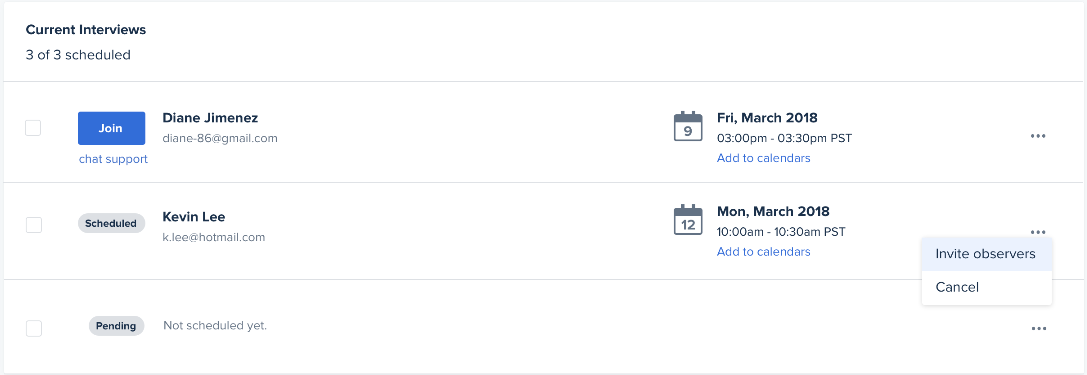
If two heads are better than one, then three or more heads attending a single session are bound to yield better outcomes. Observers might notice something you miss or understand a response or action differently.
Or, log in as an observer using one device and broadcast the session in a conference room so that more of your team members can watch without disturbing the session. The Invite observers link is your key to creating a virtual usability lab—no one-way mirrors required!
Finally, customers tell us that they like to debrief immediately after a session—when memories are fresh—to easily turn insights into action. Having multiple members of your team attend a live session means that you can quickly gather to discuss findings and make decisions on a plan of action.
Learn more about Live Conversation

Understand the ROI of your product design
Discover how product teams can align their design efforts with the business metrics that matter most to executive stakeholders.